Lend a toy that is not in the catalogue
Never turn a family away because a toy was never catalogued: lend it now, describe it later.
Who can do this: desk volunteers, coordinators and admins, with the desk open.
It happens: a donation went straight on the shelf, a label fell off, or a box of toys has not been worked through yet. You can lend the toy anyway. Gizzago makes a simple record for it and puts it on the To catalogue list, so a coordinator can describe it properly later without losing who has it.
Steps
- Load the member as usual.
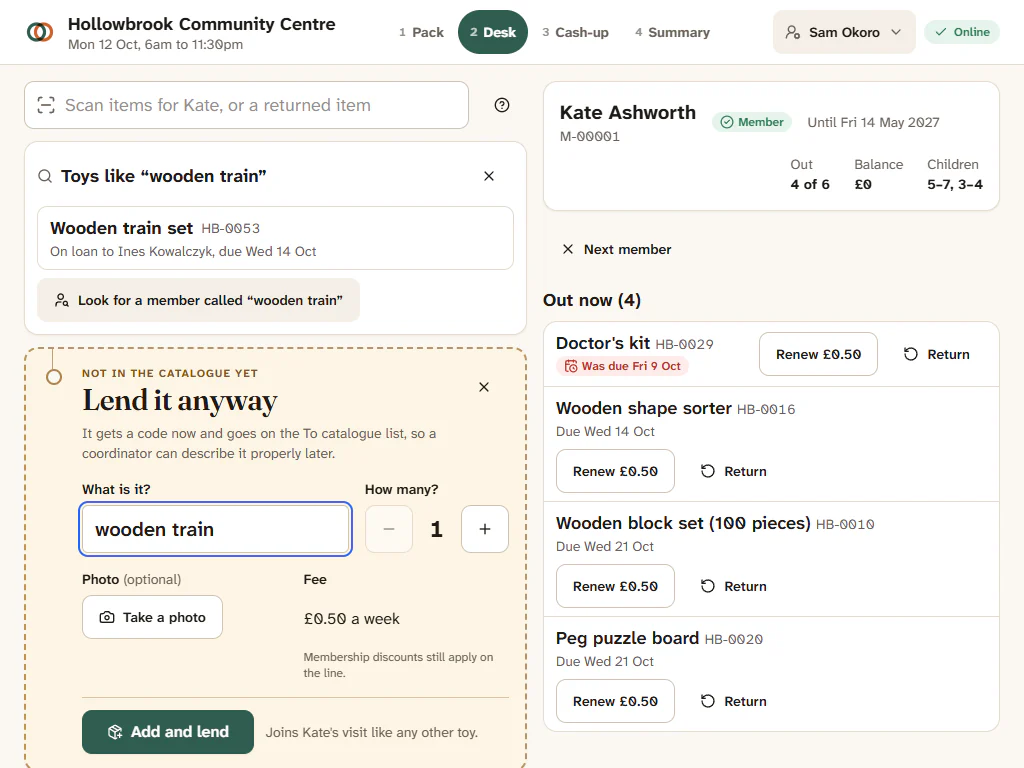
- Type what the toy is in the search box, for example "wooden train", and press Enter.
- Gizzago shows Toys like "wooden train". If one of them is the toy, choose it and lend it as normal.
- If none of them is right, press Lend it anyway. (If there were no matches at all, the form opens straight away.)
- In Not in the catalogue yet, check the name under What is it?. Give it a name a member would recognise, like "Wooden train": they will see it on their receipt.
- Set How many if there is more than one.
- Add a photo if you can (optional, but it helps the cataloguer). Take a photo opens the camera on a phone or tablet; Choose from photos picks one you already have. Hold the toy against a plain wall or table so it is easy to see.
- Check the fee. It shows your standard hire fee.
- Press Add and lend. You do not need to wait for the photo: it carries on uploading in the background.
- Finish the visit as usual: Done, then take payment.
The toy joins the visit with a Not catalogued yet badge and a new code, and a note that it was added to the visit and to the To catalogue list. Nothing is printed: write the code on a sticker or masking tape if you can.
If the photo does not upload
The photo shows on the form straight away and uploads while you carry on. If an upload fails, the form says "Photo not uploaded. Try again" with Retry. If the photo still has not arrived after the toy is lent, the desk shows a short message that it did not upload, and you can add one later from To catalogue. The visit is never held up.
When it comes back
Type the code you wrote on it, or scan its label if it has one. If it has no code, load the member and press Return next to the toy in their Out now list. Or, with no member loaded, type its name: the results show People and Toys together, and the toy says "Not catalogued yet" and who has it, with Return beside it.
What the member sees
The toy appears on their account under the name you typed, marked "Not fully catalogued yet". Reminders and renewals work as normal. It is not shown on the public website and cannot be reserved until it is catalogued.