Unlock the desk and start a session
Get from a locked desk to an open session in two taps and a PIN.
Who can do this: desk volunteers on an enrolled desk device; coordinators and admins anywhere.
Steps: unlock the desk
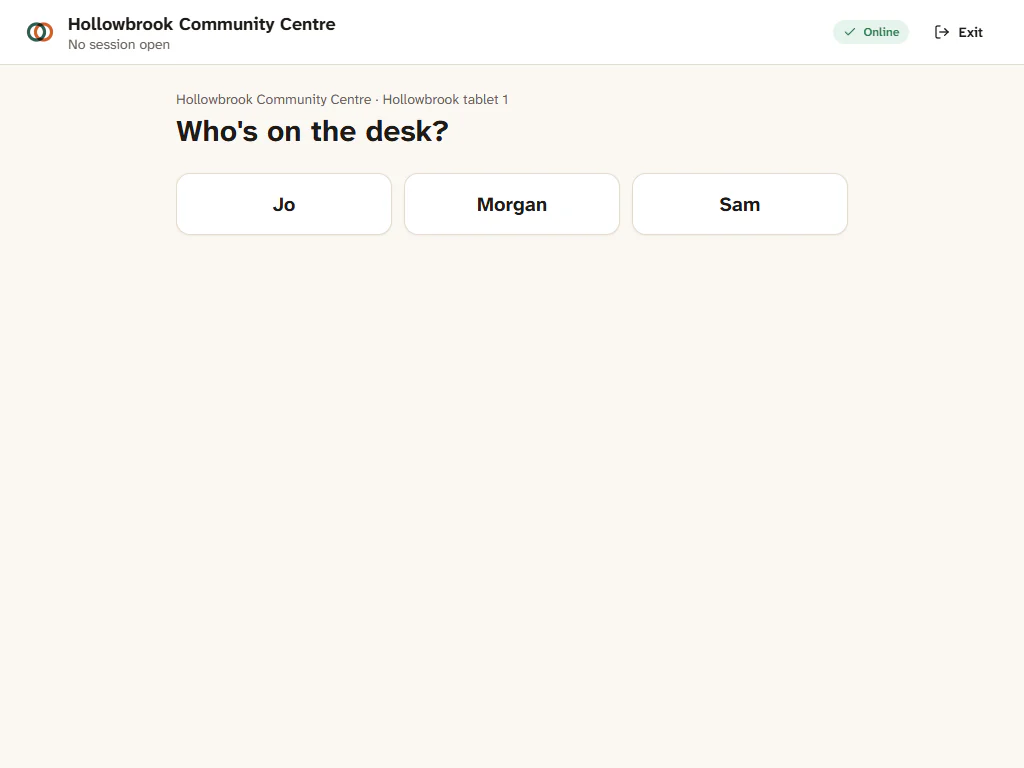
- Open the desk on the shared device. It shows Who's on the desk? with a button for each volunteer.
- Tap your name.
- Type your PIN and press Enter.
If a session is open at this site, you go straight into it, at the stage it is in: usually Pack before opening time, or Desk once it is open. The box at the top says "Type a member's name, or a toy's name or number" (or "Scan a member card, or type three letters" if your library scans barcodes).
Steps: open the desk after packing
- In the header, the stage shows Pack. When you are ready for families, press Open desk.
- The desk is now open. Type a member's name, or a toy's name or number, to begin.
Steps: no session is planned
Sometimes the library opens when there is no session in the calendar, such as an extra Wednesday.
- Unlock the desk as above.
- The desk says No session is open at your site and offers Start session now. Press it.
A session starts now at this device's site, for two hours, and the desk opens straight away. If a session already covers this time, Gizzago opens that one instead of making a second.
Steps: for coordinators, from your own phone or laptop
You do not need a shared device or a PIN: you are signed in as yourself.
- On Today, under the title, press the desk button: Start today's session, Open desk, Cash up or Start a session now. On a phone, the same button is the first row of Menu.
- The top bar also shows Pack, Open desk or Cash up when a session at your site is about to start or is running. The same buttons are on the session cards on Today.
- To start a session that is not in the calendar, you can also go to Calendar, press Add session, then Start session now at your site. Or type "start session now" in the search box at the top.
The session screen shows Exit in its header for coordinators, which takes you back to the rest of Gizzago. See Run the desk on your own phone.
If you typed the wrong PIN
After five wrong PINs, that volunteer is locked out for 15 minutes. Another volunteer can still unlock the desk. If you have forgotten your PIN, ask an admin to set a new one in Settings > Team and devices.