Take a payment
Take money for a visit, give the right change, and send a receipt.
Who can do this: desk volunteers, coordinators and admins, with the desk open. Waiving a fee may need a coordinator, depending on your library's settings.
Steps
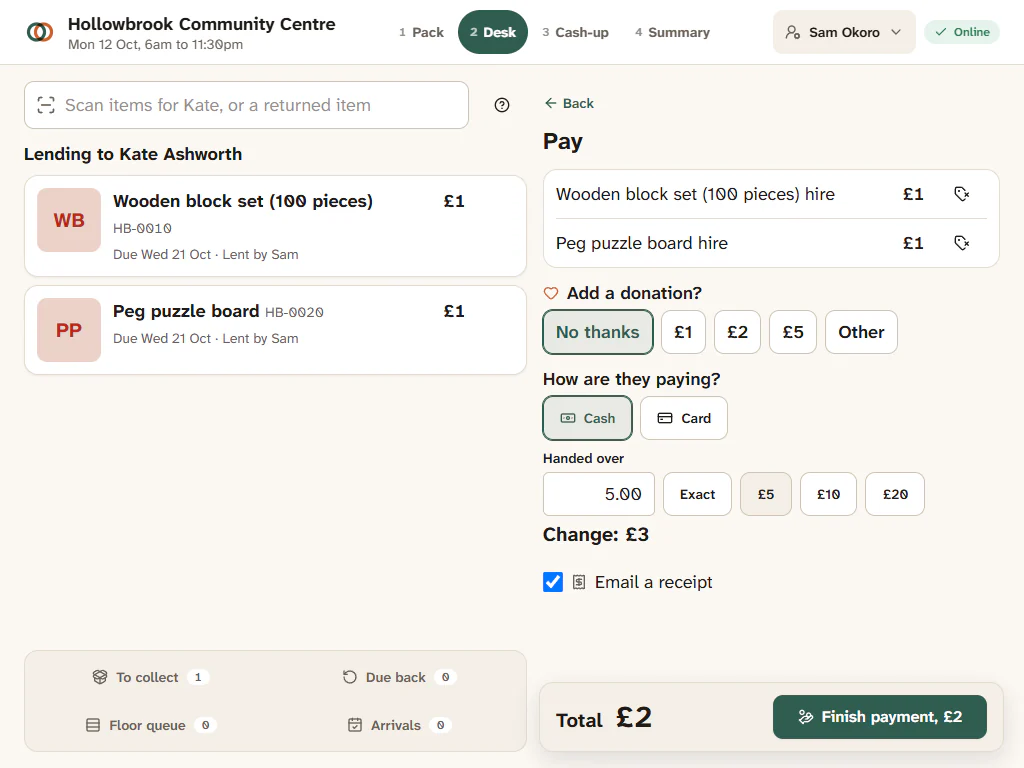
- Press Done on the visit. The Pay panel opens on the right (on a phone, it fills the screen), listing each charge: hire fees, a membership, a missing piece, a late fee or an event ticket, with the Total.
- Optional: ask about a donation. Add a donation? offers a few amounts and Other. If they add one and are a UK taxpayer, tick the Gift Aid box and fill in their full name, house name or number and postcode.
- Under How are they paying? choose one:
- Cash: type the Amount given, or tap one of the Quick amounts (Exact, £5, £10, £20), and the panel shows the change to give in large type;
- Card: they pay on your library's own card reader, and Gizzago records it. The panel says "Use your card reader, then tap Finish payment. If it declines, try again: it is the same payment.";
- On account: put it on their account to pay later (only if your library allows credit for this member);
- QR: they pay on their phone by scanning a code, if your library has card payments switched on.
- Leave Email a receipt ticked if they want one.
- Press the main button. For cash it says Take £2 cash (with your total); for the other ways to pay it says Finish payment, £2. On a phone it sits at the bottom of the screen, under the change.
Changed your mind? Press Back (or your phone's back button) to return to the visit. Nothing on it is lost.
"All done for Kate Ashworth" and, for cash, the change to give, for example "Change: £3". The desk is ready for the next member when you press Next member.
Waive a fee
Press the small Waive button on a charge, choose or type a reason (such as "Family in hardship", "Item was faulty" or "Volunteer discretion") and confirm. The charge is crossed out and the reason is kept. Every waiver is in the audit log.
If the card is declined
Try again with the same card or another method. It is the same payment, so nothing is taken twice. Nothing is recorded until you press Finish payment.
Things the desk cannot do yet
- Split one payment across two methods (some cash, some card). Take it as two visits, or put part on account.
- Refunds are done by a coordinator from the person's Payments tab, not at the desk.
Where the money shows up
Every payment is part of the session's cash-up, the member's history, and Reports > Money. Donations are kept apart from fees, so the Gift Aid schedule only includes genuine donations. See Money and the Gift Aid schedule.